Which Schema Markup to Use for SEO and AI Search
Which schema markup to use for SEO and AI search, which rich results Google has phased out, and how to add JSON-LD and find gaps across your whole site.


Schema markup is code on a page that tells search engines exactly what the page is - an article with an author and date, a product with a price or a business with an address. Use schema markup where Google shows a rich result for it or where it describes your author and organization, and know that Google requires no special markup for AI Overviews or AI Mode.
This guide is for SEO specialists and site owners who need to decide which schema.org types to implement and which to leave alone. It covers what schema markup does in Google today, what it does for AI answers, and how to find gaps across a whole site. Two rules from Google frame everything below - a manual action for structured data removes rich result eligibility but does not affect ranking, and you should never mark up content that readers cannot see on the page.
What schema markup is
Schema markup, also called structured data, is a standardized description of a page written in code using the schema.org vocabulary. It tells search engines which entities are on the page and what their properties are - the headline and author of an article, the price and availability of a product, the address and opening hours of a business. Google describes it as a way of providing "explicit clues about the meaning of a page".
Google, Microsoft, Yahoo and Yandex develop the schema.org vocabulary together. It has hundreds of types, but Google supports only some of them for rich results, and the rest at most help it understand a page.
Schema markup comes in three formats:
| Format | What it looks like | When to use it |
|---|---|---|
| JSON-LD | A separate <script type="application/ld+json"> block in the page code | By default, because it stays separate from the HTML and is easy to generate |
| Microdata | itemscope and itemprop attributes in HTML tags | When your template already uses it and rewriting does not pay off |
| RDFa | vocab and property attributes in HTML tags | Rarely, mostly in older systems |
Google says all three formats are equally fine for it, but recommends the one that is easiest to implement and maintain, which in most cases is JSON-LD.
Does schema markup help SEO?
Schema markup helps SEO in two ways - it makes a page eligible for rich results and gives Google an unambiguous description of the page. A rich result, often called a rich snippet, is a listing with extra elements such as star ratings, a price, product availability, an event date or a breadcrumb trail. It takes up more space and usually draws more attention than a plain link.
There is no guarantee, though. Google says it does not guarantee that structured data will show up in search results, even when a page is marked up correctly. Page quality, the query and the device also decide whether a rich result appears.
It also helps to know what schema markup does not do. According to Google, a manual action for structured data issues removes a page's eligibility for rich results but does not affect how the page ranks in web search. Schema markup is not a factor that lifts a page in rankings by itself. It works through the look of the listing and through better understanding of the content.
Does schema markup help AI search?
Schema markup is not a requirement for Google's AI answers. In its documentation on AI features, Google says there is no special schema.org structured data you need to add to appear in AI Overviews or AI Mode, and no other special optimizations are necessary. The one structured data recommendation in that context is that your markup should match the visible text on the page.
"If Google says it is not needed, does schema make any sense for AI?" It does, but for a different reason than many guides promise. Schema markup clearly describes the author, the organization and the publication and update dates, which are the signals used to judge how trustworthy content is. We explain how to show them on a page under the E-E-A-T dimension.
Other AI systems, such as ChatGPT and Perplexity, publish no schema.org guidance, and their documentation for OAI-SearchBot and PerplexityBot covers crawler access rather than markup. AI answers cite passages of text, not markup, so a page with perfect schema markup and weak content will not get cited. We cover what does drive citations in how to appear in AI Overviews.
Which schema markup to use
Schema markup follows the page type, not a list of every available type. A product page needs different markup than an article, and an article needs different markup than a contact page. The table shows typical sets:
| Page type | Schema.org types | What they do in Google |
|---|---|---|
| Article or blog post | Article or BlogPosting, Person (author), BreadcrumbList | Clearer author and dates, breadcrumbs in the listing |
| Product | Product, Offer, AggregateRating or Review | Price, availability and ratings in the listing |
| Local business | LocalBusiness with address and hours | Business details in local results |
| Homepage | Organization, WebSite | Logo and site name in results |
| Job posting | JobPosting | A listing in Google's job search experience |
| Event | Event | Event date and location in the listing |
| Recipe | Recipe | Image, cooking time and ratings |
Start with the types that earn a rich result on your pages - Product with an offer for a store, LocalBusiness for a service company, Article with an author for a publisher. Add types without a rich result only when they describe something that matters for trust, such as the author or the organization.
Is schema markup still relevant?
Schema markup is still relevant for supported rich results and for describing entities, but Google limited FAQ and deprecated HowTo rich results in 2023, then announced the phase-out of 7 more types in 2025, nine types in total. Markup for these types does no harm, but it no longer delivers the result many sites added it for.
| Type | Change | Date |
|---|---|---|
| FAQPage | Rich result only for well-known government and health websites | August 2023 |
| HowTo | Rich result fully deprecated | September 2023 |
| Book Actions, Course Info, Claim Review, Estimated Salary, Learning Video, Special Announcement, Vehicle Listing | Announced phase-out from search results | June 2025 |
| Course Info, Claim Review, Estimated Salary, Learning Video, Special Announcement, Vehicle Listing | Removed from Search Console reports and the Rich Results Test | September 2025 |
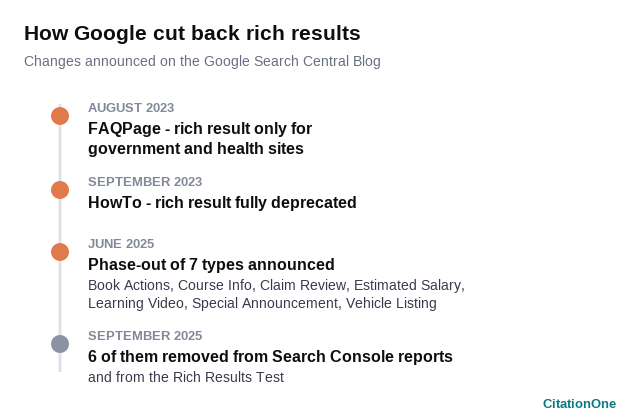
With the 2025 change, Google noted that phasing out these types does not affect how pages rank. FAQ schema markup (FAQPage) still makes sense on pages with a real question and answer section, because it describes that structure clearly, but adding an FAQ section only to win a rich result is no longer worth it.
How to add schema markup with JSON-LD
Schema markup in JSON-LD is a script in the page code that describes the same information readers see on screen. In WordPress, an SEO plugin usually handles it, in stores the platform template does, and on custom sites the page template does. For a single page without a plugin, a schema markup generator can produce the code, which you then paste into the page. Here is an example for a blog post:
<script type="application/ld+json">
{
  "@context": "https://schema.org",
  "@type": "BlogPosting",
  "headline": "Which Schema Markup to Use for SEO and AI Search",
  "datePublished": "2026-10-30",
  "dateModified": "2026-10-30",
  "author": {
    "@type": "Person",
    "name": "First Last",
    "url": "https://example.com/author"
  },
  "publisher": {
    "@type": "Organization",
    "name": "Company Name",
    "logo": { "@type": "ImageObject", "url": "https://example.com/logo.png" }
  }
}
</script>
Adding markup through Google Tag Manager or your own script also works. Google says it can process structured data that is available in the DOM when it renders the page, and lists GTM among the most common ways to do it. The documentation adds two caveats - copying page data into GTM increases the risk of a mismatch between content and markup, and for products, dynamically generated markup can make Shopping crawls less frequent and less reliable. It is safer to put JSON-LD directly in the page HTML and use a tag manager only where you cannot edit the template.
The most important rule comes from Google's guidelines - don't mark up content that is not visible to readers of the page, and your structured data must be a true representation of the page content. The date in the markup should be the date shown under the headline, and the author should be the same person named in the content.
How to test schema markup and find gaps
Schema markup testing covers three levels - a single page, Search Console reports and the whole site. Each level answers a different question:
| Level | Tool | What it shows | Limitation |
|---|---|---|---|
| A single page | Rich Results Test | Whether the page qualifies for Google rich results and which errors it has | Checks only types Google supports |
| A single page | Schema Markup Validator | Syntax of every schema.org type | Says nothing about rich result eligibility |
| Whole site, implemented types | Rich result reports in Google Search Console | Pages with valid markup and errors per supported type | Sees only types you already added |
| Whole site, missing types | Crawl of the sitemap compared with page types | Which markup is missing on each kind of page | Needs a crawler or a dedicated tool |
None of Google's tools tell you which markup is missing on pages of a given type. For that you need to crawl the whole site and compare each page with the set of types that fits its kind.
The schema gap analysis tool handles that last step. It reads the code of every page in your sitemap, identifies the type of each page - one of 18 profiles, from article to job posting - and compares the detected markup with a catalog of more than 30 schema types. It drops recommendations that do not fit the content, such as a recipe without an ingredient list, instead of suggesting wrong markup.
Common schema markup mistakes
The most common schema markup mistakes come from treating schema as a trick instead of a description of the page. Four of them show up most often:
- Marking up content that is not visible on the page. For example, ratings that do not appear in the content or an FAQ section hidden in the code.
- Adding FAQPage only to win a rich result. Since 2023, only government and health sites get it.
- Markup that does not match the page. A different date in the markup than under the headline, or a price in the markup that differs from the price on the page.
- Implementing once and forgetting. New page types added after launch stay unmarked, because nobody checks the whole site.
In my view, most of the time wasted on schema today goes into markup added "for AI" without checking whether the basic types are implemented correctly. Filling in the author, dates and organization on every article does more than adding exotic types that no search engine uses.
Summary
Implement schema markup where it earns a rich result or clearly describes your author and organization. Google requires no special markup for AI Overviews or AI Mode, and FAQ and HowTo rich results have effectively disappeared, so the list of types worth adding is shorter than many guides suggest. Start with the set for your page types, implement it in JSON-LD to match the visible content, and check the whole site for gaps. For how schema fits into GEO, read what is GEO, and for reviewing your content as a whole, see our content audit guide.
Check the structured data of your whole site with the schema gap analysis tool - point it to your sitemap and get a list of pages with missing and incomplete markup for each page type.
Frequently asked questions
These are the questions that come up most often when implementing schema.org structured data.
Does schema markup affect rankings?
Schema markup does not raise rankings directly. Google says a manual action for structured data only removes rich result eligibility and does not affect ranking. It can help indirectly, because a rich result with a price or rating usually draws more clicks, and markup makes it easier for Google to understand the page.
Is FAQ schema still worth it?
FAQPage makes sense on pages with a real question and answer section visible to readers, because it describes that structure clearly. Since August 2023, though, Google shows FAQ rich results only for well-known government and health sites, so for other sites this markup will not change how the listing looks.
Should I use JSON-LD or microdata?
All three structured data formats, JSON-LD, microdata and RDFa, are equally fine for Google, but it recommends JSON-LD as the easiest to implement and maintain. JSON-LD sits in a separate script, so template changes do not break it. Keep microdata only when your template already uses it and it works correctly.
How do I check schema markup on my site?
Check a single page in Google's Rich Results Test, and validate every type in the Schema Markup Validator. The rich result reports in Search Console show errors across the site. Only a review of every page in your sitemap, compared against each page's type, shows which markup is missing.
Does schema markup help with ChatGPT?
OpenAI publishes no schema.org guidance for ChatGPT search. ChatGPT cites passages of text, so citations depend on the page content and on whether the OAI-SearchBot crawler can fetch it. Schema markup can help describe your author and company clearly, but it cannot replace content that answers the question.
Sources
- Google Search Central, AI features and your website, accessed 2026-11-25.
- Google Search Central, Introduction to structured data markup in Google Search, accessed 2026-11-25.
- Google Search Central, General structured data guidelines, accessed 2026-11-25.
- Google Search Central, Generate structured data with JavaScript, accessed 2026-11-25.
- Google Search Central Blog, Changes to HowTo and FAQ rich results, August 8, 2023, accessed 2026-11-25.
- Google Search Central Blog, Simplifying the search results page, June 12, 2025, accessed 2026-11-25.