How to Appear in AI Overviews? A Guide for Websites
How to appear in Google AI Overviews. 7 steps, the new Search Console setting and data from 996 results pages on how your ranking affects AI Overview citations.

To appear in AI Overviews, your page has to be indexed by Google and eligible to be shown with a snippet, and Google sets no additional technical requirements. Whether it gets cited depends on its ranking, a direct answer to the question and follow-up questions, and facts with sources. It is also worth checking in Search Console that your site is not excluded from generative AI features.
This guide is for SEO specialists, marketers and site owners who want their content cited in Google's AI Overviews. For the wider background, see What is GEO.
What AI Overviews are and when they appear
AI Overviews are AI-generated summaries at the top of Google results, with links to the pages they draw on. They are available in many countries and languages, including the United States and English.
An AI Overview appears only when Google decides that a summary adds something to the regular results. That is why some queries get an AI summary and others do not, even within a single topic. In practice, informational questions, how-to queries and comparisons trigger AI Overviews more often, while short navigational searches and brand names rarely do.
For publishers, this means a shift in traffic. Some users get their answer without clicking, and Google says that clicks from results pages with AI Overviews are of higher quality, because users are more likely to spend more time on the site. Search Console does not report AI Overviews traffic separately, so the best way to check the effect on your own CTR is to compare clicks and impressions for queries with an AI summary before and after it appeared.
AI Overviews have no user toggle to turn them off. After searching, users can choose the "Web" filter, which shows text links only.
Where AI Overviews get their sources
AI Overviews take their sources from Google's index, and Google says that the same SEO fundamentals apply to AI features as to regular results. It also describes how AI Overviews and AI Mode may issue multiple related searches across subtopics and data sources to gather a wider set of links than classic results.
How much does ranking matter? We checked this with data from CitationOne audits, covering 996 unique Polish search results pages with an AI Overview, as of November 10, 2026. The table shows how often the page in a given position was cited in the AI Overview (matched by exact URL). The data comes from the Polish market, so treat it as a reference point and not as a figure for US results.
| Position in the top 10 | Cited in the AI Overview |
|---|---|
| 1 | 59.9% |
| 2 | 52.9% |
| 3 | 46.8% |
| 4 | 40.8% |
| 5 | 35.3% |
| 6 | 33.2% |
| 7 | 32.9% |
| 8 | 28.6% |
| 9 | 27.8% |
| 10 | 28.9% |
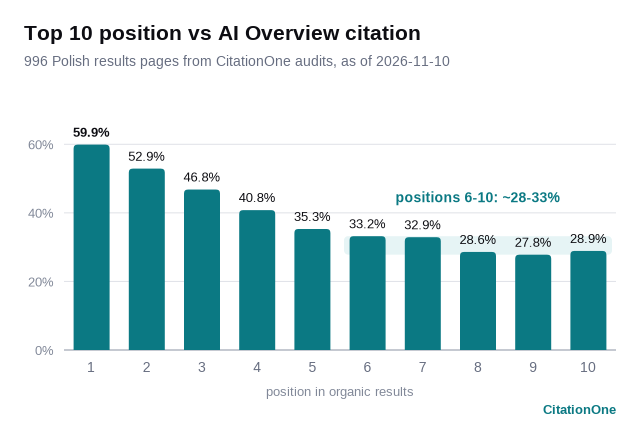
It seems simple, the higher the better. The shape of the curve is more interesting, though. Between positions 1 and 5, the chance drops by almost 25 percentage points, and in positions 6-10 it barely changes. What is more, AI Overviews cited no domain from the top 10 in 13.4% of results pages, drawing most often on Facebook, YouTube and Reddit. Genuine answers from your experts in community discussions on such platforms can therefore also bring your brand into AI Overviews.
In my view, this is the most important takeaway for planning your work. Pages that rank in the top 5 are clearly more likely to be cited, but a page in the second half of the top 10 is still cited in roughly one in three cases. Keep in mind that this is a correlation and does not prove cause, and the queries come from CitationOne audits, so the sample reflects our users' topics.
7 steps to get cited in AI Overviews
Getting cited in AI Overviews depends on two groups of conditions. Steps 1-2 check whether Google can use your page at all (index, snippet and the Search Console setting), and steps 3-7 raise the chance of being chosen, through a top 5 ranking, an answer at the start of each section, follow-up questions, facts with sources and a visible author.
1. Check indexing and snippet eligibility
Your page has to be indexed and eligible to be shown with a snippet. Check the indexing status of your most important pages in Search Console. Also review your page code for the nosnippet, data-nosnippet and max-snippet directives, because according to Google they limit what the search engine can show from your page, including the text AI Overviews can use.
2. Check the "Search generative AI" setting in Search Console
In Search Console, go to Settings and then to "Search generative AI". The setting has three options:
- Including your site in generative AI features, which is the default.
- Excluding your site, after which its links and content do not appear in AI Overviews, AI Mode and Discover.
- Inheriting the setting from a parent property, which is the default for child properties.
According to Google, an exclusion usually takes effect within 1-2 days and does not affect regular search results or AI model training. Training is controlled by a separate mechanism, Google-Extended.
3. Aim for the top 5
Classic organic rankings still decide whether your page enters the pool of sources for AI Overviews. In our data, the citation rate falls by almost 25 percentage points between positions 1 and 5, and the biggest gain in the chance of being cited comes from reaching positions 1-5, so queries where you rank 6-15 are good candidates to improve first.
4. Open every section with the answer
The first sentences of the page and of every H2 section answer the question directly, in 1-2 sentences. AI Overviews build their answer from passages, so a section that only gets to the point after three paragraphs loses to the competition. Phrase H2 and H3 headings as the real questions people ask and put the answer in the sentence right below, so the system can match the heading to the query and lift the passage. The BLUF dimension describes this principle.
5. Answer follow-up questions
Collect questions from the "People also ask" box and related searches for your query and answer them in separate sections. Query fan-out means that AI Overviews look for answers to these questions too. The fan-out and AIO coverage dimension measures how many of them your page covers.
6. Give facts, sources and your own data
Back every key claim with a specific number, date, your own test data or a named source. Google's guide to generative AI features encourages content based on your own knowledge and experience that cannot be found everywhere else. Numbers with units, dates, results of your own tests and references to sources raise the information density and information gain of a text. Short definitions, step lists and comparison tables are easy to lift from a page as a ready passage for an answer.
For an online store, the same rules apply to category and product pages. Start a category description with the answer to the question customers ask before buying ("which city bike should I buy"), and on a product page give the specifications in a table and answer questions about shipping, returns and sizing.
7. Show the author and freshness
A visible author with experience in the topic, an update date and consistent information about your business build the credibility of a page, including one cited in AI Overviews. In practice, this means an author byline with a short description of their experience, a link to the author page, visible publication and update dates, and the same dates in Article structured data (datePublished, dateModified). The E-E-A-T dimension covers this.
What you do not need to do
Google explicitly lists several things that are not needed to appear in AI Overviews:
- Creating files such as llms.txt, because Google Search does not use them.
- Adding special schema.org markup for AI, because structured data is not required for generative AI features. Standard types such as Article or Product still help Google understand your page in general.
- Breaking content into tiny chunks, because according to Google there is no such need and no ideal page length.
"If SEO is enough, why a separate guide?"
Because AI Overviews reward pages differently from rankings. Of two pages in similar positions, the one with a ready passage that answers the question and covers follow-up questions wins. Google also warns against mass-producing pages and artificially building mentions.
How to measure results in AI Overviews
Google includes traffic from AI Overviews and AI Mode in the Search Console performance report, under the "Web" search type, together with traffic from other results. That report shows the combined effect without isolating citations.
You can check citations manually by searching for your queries and noting whether your page is among the links in the AI Overview. The result depends on location, though, and can vary between searches, and checking dozens of queries by hand takes hours.
The CitationOne audit checks whether there is an AI Overview for a chosen keyword and whether it cites your page. It also compares your text with the top 10 on 10 content quality dimensions plus E-E-A-T and shows which follow-up questions are missing.
Summary
AI Overviews draw on pages from Google's index, and pages in the top 5 have the best chance. Which page gets chosen depends on a passage that answers directly and on coverage of follow-up questions. Start by checking the Search Console setting and any directives that limit your snippet, then rebuild your most important pages so that every section opens with the answer.
Check your page with the CitationOne audit to see whether the AI Overview cites it for your keyword and what to fix to raise your chances.
Frequently asked questions
How do I get my site into AI Overviews?
To get your site into AI Overviews, make sure your pages are indexed and eligible for a snippet, and that the "Search generative AI" setting in Search Console does not exclude them. Then improve rankings toward the top 5, open every section with a direct answer, cover follow-up questions and add facts with sources. Google does not let site owners request inclusion directly.
Why are AI Overviews not showing up for my query?
AI Overviews appear only for queries where Google decides a summary is helpful, and only in supported countries and languages. Short navigational searches often have no AI Overview, while longer questions and comparisons trigger it more often. Choosing the "Web" filter after searching also hides it.
Does excluding my site from AI Overviews lower my Google rankings?
According to Google, excluding your site with the "Search generative AI" setting is not a ranking signal and does not affect regular search results. Your site only loses impressions and traffic from generative AI features. To remove a page from Google results entirely, Google recommends the noindex directive.
How do AI Overviews differ from AI Mode?
AI Overviews are a summary above the regular results that Google shows only for some queries. AI Mode is a separate, conversational search mode that is useful for complex questions and comparisons. Both can use query fan-out, and Google applies the same requirements to pages in both.
Do I need an llms.txt file to appear in AI Overviews?
You do not need an llms.txt file. Google says its search engine does not use such files, so adding one neither helps nor hurts your visibility in AI Overviews. Indexing, snippet eligibility and content that answers questions directly matter more.
Sources
- Google Search Central, AI features and your website, accessed 2026-11-10.
- Google Search Central, Optimizing your website for generative AI features on Google Search, accessed 2026-11-10.
- Search Console Help, Search generative AI control, accessed 2026-11-10.
- Google Search Help, Find information in faster and easier ways with AI Overviews, accessed 2026-11-10.
- CitationOne, analysis of 996 Polish search results pages with an AI Overview from CitationOne audits, as of 2026-11-10.