How to Build an Internal Linking Strategy
How to build an internal linking strategy from topic clusters, choose anchor text that follows Google guidelines and find orphan pages that no link reaches.

An internal linking strategy is a plan for which pages on your site link to which, so that Google can discover every page and see which ones matter most for each topic. An internal linking strategy rests on topic clusters - the pillar page links to every supporting page, each supporting page links back to the pillar and to its siblings where the content truly connects, and every link has descriptive anchor text inside a sentence that explains where it leads.
Google's SEO Starter Guide says that the vast majority of new pages Google finds every day are found through links, which makes a planned link network the base of both SEO and visibility in AI answers. This guide closes a series on cleaning up a site. After keyword clustering, fixing cannibalization and content pruning, the last step is connecting the pages that remain into one coherent network. It is written for SEO specialists and editors who run a site with dozens or hundreds of pages and want to link by plan, not as an afterthought when publishing the next post.
What internal linking is
Internal linking is the practice of adding links from one page of your site to another page on the same domain. Together, these links form the link structure of a site, and each zone of a page plays a different role:
| Zone | Role for users and crawlers |
|---|---|
| Main menu | Shows the key sections and categories of the whole site |
| Footer and secondary menu | Lead to permanent pages such as contact, terms or pricing |
| Breadcrumbs | Show where a page sits in the hierarchy and link to its parent category |
| Category and tag lists | Collect pages on one topic in one place |
| Contextual links in body content | Connect a specific passage with the page that develops that point |
Navigation links appear on every page in the same form, so they mainly help crawlers discover pages. Contextual links carry topical relevance, because the anchor and the sentence around it describe the target page.
Internal links differ from external links in one simple way. Internal links stay on your domain and you control all of them, while external links point to or come from other domains. A typical contextual link sits in a sentence like this one from a post about heat pump installation costs - "Before you compare quotes, check whether a heat pump is worth it for a house of your size", with "whether a heat pump is worth it" as the anchor. This guide focuses on contextual links inside body content, because you plan them with every new post and they carry the most context. Navigation gets designed once, when the site is built, while contextual links need attention with every publication and every change in site structure.
Google's SEO Starter Guide says that the vast majority of new pages Google finds every day are found through links. A sitemap helps, but a page with no internal links pointing to it looks unimportant to a search engine.
Why internal links matter for SEO and AI search
Internal links affect three things that decide visibility - whether a crawler finds a page, whether it understands the topic, and whether it treats the page as important. All three carry over to AI answers, because Google AI Overviews and AI Mode draw on the same index as regular results.
Discovery is the easiest effect to see, and a strong internal link structure improves crawl efficiency. Google's crawler follows links from pages it already knows, so a new post linked from a strong older article gets found faster than a post listed only in the sitemap.
Topical context comes from the anchor text and the sentence around it. Google's link guidelines say that the words before and after links matter, so pay attention to the sentence as a whole and not only to the link text. A link with the anchor "content audit" in a sentence about comparing a page with the top 10 says more than the same anchor in a "see also" list.
Page importance follows from how many internal links point to a page and where they come from. A pillar page that every supporting page in the cluster links to gets a clear signal that it is the entry point to the topic.
For AI Overviews and AI Mode, Google sets the same condition as for regular search - a page must be indexed and eligible to be shown with a snippet. Internal linking is not a separate citation factor, but without it a page may never reach the index in the first place.
How to build an internal linking strategy step by step
An internal linking strategy organizes a site in six steps - from a map of topics, through choosing pillar pages and link directions, to checking for pages with no incoming links. The order matters, because each step uses decisions from the previous one.
- Group your pages into topic clusters. A cluster is a set of pages that answer related questions within one topic. If your keywords are not grouped yet, start with keyword clustering, since the groups from that analysis are a ready map for linking.
- Pick one pillar page in each cluster. The pillar page answers the broadest question, such as "heat pump", while supporting pages answer narrower ones, such as installation cost or whether a heat pump is worth it. One page can be the pillar for only one topic.
- Resolve cannibalization before linking. If two pages answer the same question, you cannot tell which one deserves the links. First fix keyword cannibalization, then plan links to the page that stays.
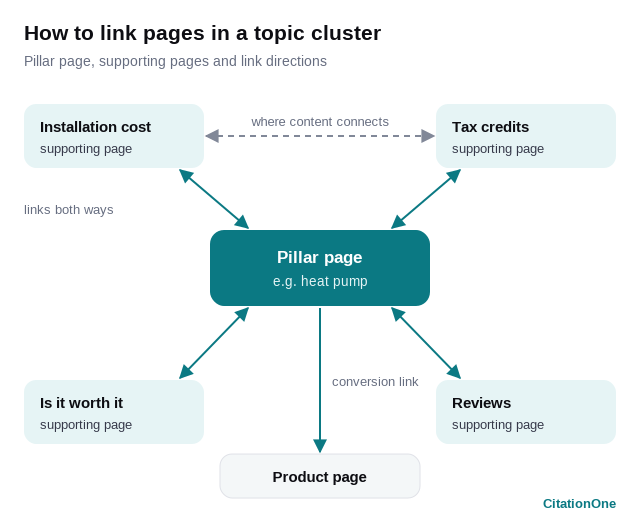
- Set link directions. The pillar links to every supporting page, every supporting page links back to the pillar, and links between supporting pages go only where one page truly develops a point from the other. Add a link from the cluster to a product or conversion page when the topic connects to it.
- Choose the paragraph and the anchor. Place the link in a sentence about the topic of the target page, with anchor text that says what the reader will find there. The rules for anchors follow in the next section.
- Check for pages with no incoming links. After you roll out the plan, count the pages that still have no links from body content. Each of them is either a gap in the plan or a candidate for pruning.
You can keep the whole plan in one spreadsheet. Here is an internal linking strategy template filled in for a small heat pump cluster:
| Page | Role | Links to | Gets links from | Anchor variants |
|---|---|---|---|---|
| Heat pumps guide | Pillar | All 4 supporting pages, product page | All 4 supporting pages | heat pump guide, how heat pumps work |
| Installation cost | Supporting | Pillar, tax credits | Pillar, tax credits | heat pump installation cost, what installation costs |
| Tax credits | Supporting | Pillar, installation cost | Pillar, installation cost | heat pump tax credit, federal tax credit for heat pumps |
| Is it worth it | Supporting | Pillar | Pillar, reviews | is a heat pump worth it, heat pump payback |
| Reviews | Supporting | Pillar, is it worth it | Pillar | heat pump reviews, owner experiences |
One row per page is enough. The "Gets links from" column shows orphan pages at a glance, because an empty cell means no page links there.
A common rule of thumb says that key pages should sit within three clicks of the homepage. Google does not publish such a number, so treat it as a check for site architecture rather than a requirement. In a well-planned cluster it holds on its own, because every supporting page is one click from its pillar.
How to choose anchor text for internal links
Good anchor text is descriptive, reasonably concise and relevant both to the page it is on and to the page it links to - this is how Google describes it in its link guidelines. In practice, a good internal anchor usually has 2 to 6 words, which are the default limits in the CitationOne tool. Google also suggests a simple test. Read the anchor text on its own, out of context, and check whether it makes sense by itself.
You will see four types of anchor text in internal linking:
- Exact match. The anchor repeats the target page's keyword, such as "heat pump installation cost".
- Partial match. The keyword sits in a broader phrase, such as "what installing a heat pump costs in a family home".
- Branded or named. The name of a brand, product or tool, such as "the internal linking tool".
- Generic. "Click here" or "read more", which Google advises against.
Mix the first three types in your plan and avoid the fourth. Over-optimization starts when one exact-match anchor repeats on every link to a page. Weak anchors follow recurring patterns:
| Anchor text | Problem | Better version |
|---|---|---|
| click here | says nothing about the target page | content audit pricing |
| read more | the same text leads to many pages | how to update old blog posts |
| article | a generic word with no topic | guide to keyword cannibalization |
| heat pump price installation cost worth it | keyword stuffing | heat pump installation cost |
| a whole paragraph as a link | too long, blurs the topic | one phrase naming the topic of the page |
An exact-match anchor is not a mistake on its own, but the same anchor everywhere looks unnatural and gives Google no new information. Use several variants instead - the full topic name, a question form and a short name - each matched to the sentence it sits in. Google lists keyword stuffing in link text as a violation of its spam policies.
One mistake shows up more often than the rest. The same anchor text leads to two different pages in different posts, for example "SEO audit" pointing once to a service page and once to a blog post. That signal is contradictory and is often the first sign of cannibalization.
How many internal links per page
Google says plainly that there is no magical ideal number of links a given page should contain, and adds that if you think it's too much, it probably is. The right number depends on the length of the text and on how many of its points genuinely connect to other pages. A workable baseline for a post of 1,500-2,500 words is up to 5 new contextual links per page and up to 10 links to one target across the site, the default limits in the CitationOne tool.
Three rules work well in practice:
- Place a link where the text reaches a point developed on another page, not in one block at the end.
- Avoid chaining links next to each other, because Google notes that readers then find them harder to tell apart.
- Link to the same target once per article, since repeated links to one page add nothing.
These limits are a starting point, not a rule, and you can change them in the internal linking tool before each analysis.
How to find orphan pages
An orphan page is a page that no other page on your site links to. Visitors reach it only from outside, and Google may know it only from the sitemap. Google recommends that every page you care about has a link from at least one other page on your site.
You find orphan pages by comparing two lists of URLs:
- All URLs that should be indexed, from your sitemap, your CMS database or the pages report in Google Search Console.
- URLs a crawler reached by following links, from a tool such as Screaming Frog started at the homepage without loading the sitemap.
URLs on the first list that are missing from the second are orphan pages. The decision for each one is simple. If the page has value, it gets a link from its cluster pillar and from one or two supporting pages. If it does not, it goes on the list for content pruning.
Before writing this guide, I counted the links between posts on this blog. The post on what GEO is - the broadest topic here - received links from 3 other posts but did not link to any of the 8 more detailed ones. The keyword clustering guide had just 1 incoming link. This asymmetry appears by itself when links get added only from new posts to older ones, and nobody goes back to older posts to link to the new ones. After that check I added links from the GEO post to 4 detailed guides, and a link to this guide from three posts in the site cleanup series.
The internal linking tool runs this check across your whole sitemap. It shows pages with no links from body content and suggests specific paragraphs worth linking from.
Internal links after pruning and redirects
After content pruning and merging pages, your internal linking strategy needs a cleanup pass - update internal links so they point straight to the final URL and not through a 301 redirect. A redirect works, but every link through one costs the crawler an extra request and risks a redirect chain if the target URL ever changes too.
After every change in site structure, check three things:
- Links to URLs with a 301 redirect. Replace them with a link to the final URL.
- Broken internal links that return 404. Remove them or point them to the closest related page.
- Anchors after merging pages. If two pages became one, anchors that pointed to both should describe the topic of the page that stayed.
In its guide to site moves with URL changes, Google recommends that you replace all internal links that pointed to old URLs based on the redirect mapping you prepared. The same rule works for smaller changes, such as merging a few posts.
Common internal linking mistakes
The most common internal linking mistakes come from linking without a plan or from technical implementations a crawler cannot read. Five of them recur on sites with older content and no linking plan:
- Every link points to the homepage and the contact page. Those pages already get the most links from navigation, while supporting pages get none.
- Links only in the footer and menu. Navigation shows structure but does not connect topics at the paragraph level.
- Links built with JavaScript without an
<a href>element. Google lists<span href>,<a onclick>andhref="javascript:…"as forms it may fail to crawl. - Several links next to each other in one sentence. Readers cannot tell which one leads where.
- The same anchor for different pages. This sends the contradictory signal described in the anchor text section.
"If Google has my sitemap anyway, why bother with all these links?" A sitemap tells Google that a URL exists. A contextual link tells Google what the page is about and how it connects to the rest of the site, and a sitemap carries none of that information.
In my view, the most wasted asset in internal linking is strong older posts that nobody revisits. They have backlinks and traffic, yet they link only to pages that existed on the day they were published. One session spent adding links to your 10 strongest posts usually does more than another new post in the cluster.
Summary
An internal linking strategy works best as the last step of cleaning up a site - after keyword clustering, fixing cannibalization and pruning. At that point you know which page is the pillar for each topic, which supporting pages complete it and which URLs no longer exist. Your next step is to count pages with no incoming links and add links from older posts.
Check your site with the internal linking tool - point it to your sitemap and get a list of paragraphs with ready anchor text, target URLs and orphan pages.
Frequently asked questions
How can I find the internal links on my website?
Google Search Console shows them in the Links report, in the "Top linked pages" table for internal links, which lists how many internal links point to each page. For a full list of links with anchors and source pages, run a crawler such as Screaming Frog, which records every link it follows from the homepage.
Do menu links count as internal links?
Yes, links in the menu, footer and breadcrumbs are internal links, and Google uses them to discover pages. They show the structure of the whole site, though, and not the connections between specific texts. Supporting pages in a cluster also need contextual links placed in a sentence about their topic.
Should internal links use exact-match anchor text?
An exact-match anchor is fine when it fits the sentence and describes the target page. The problem is the same anchor on every link, or several keywords packed into one link, which Google treats as spam. It is safer to mix variants, such as the full topic name, a question form and a short name.
Should I use nofollow on internal links?
Usually not. Since 2019, Google treats nofollow as a hint rather than a directive, so it does not reliably keep a page out of the index. If a page should not appear in results, such as a cart or login page, use noindex. Nofollow on an internal link only weakens the signal for a page you care about.
Do internal links help with citations in AI answers?
Indirectly, yes. AI Overviews and AI Mode use the Google index, and internal links help pages get into it and show which page leads on a topic. No provider has confirmed internal linking as a separate citation factor, so treat it as a condition for visibility rather than a guarantee of being cited.
Sources
- Google Search Central, Link best practices for Google, accessed 2026-11-15.
- Google Search Central, SEO Starter Guide, accessed 2026-11-15.
- Google Search Central, AI features and your website, accessed 2026-11-15.
- Google Search Central, Site moves with URL changes, accessed 2026-11-15.
- Google Search Central Blog, Evolving "nofollow" - new ways to identify the nature of links, accessed 2026-11-15.