How to Rank in ChatGPT? A Step-by-Step Guide
How to rank in ChatGPT and get your business recommended. 7 steps based on OpenAI documentation, covering crawlers, indexing, content, mentions and tracking.

To rank in ChatGPT, your site has to be open to the OAI-SearchBot crawler, indexed by search engines and built to answer your customers' questions directly with facts and sources. ChatGPT mentions businesses in two ways, from the knowledge the model learned in training or from a web search it runs when a question needs current information.
ChatGPT search optimization is the part of GEO (Generative Engine Optimization) focused on ChatGPT. Ranking in ChatGPT means your brand appears in the text of the answer and your page appears among the sources listed under it. Content changes matter too, because in the Princeton GEO study adding quotations, statistics and source citations raised visibility in AI answers by up to about 40%. This guide is for business owners, marketers and SEO specialists who see ChatGPT recommending their competitors and want to know what to do on their own site. If you are new to the topic, start with What is GEO.
Where ChatGPT gets information about businesses
ChatGPT gets its knowledge about businesses from two sources, the model's training data, collected by the GPTBot crawler, and web search, for which the OAI-SearchBot crawler supplies pages. Each source calls for different work.
| OpenAI crawler | What it does | Does blocking it remove your site from ChatGPT search? |
|---|---|---|
| OAI-SearchBot | Collects pages for ChatGPT search results | Yes |
| GPTBot | Collects data for training models | No |
| ChatGPT-User | Visits a page during a conversation on behalf of the user | No |
The first source is the model's knowledge. The model learns from data collected up to a certain date and answers from that knowledge when it does not search the web. GPTBot is the crawler that collects pages for training. According to OpenAI, blocking it in robots.txt means your content should not be used to train models.
The second source is web search. ChatGPT can run it on its own when a question benefits from current information, and users can also turn it on manually. OAI-SearchBot is the crawler that supplies pages for ChatGPT search results.
OpenAI also runs a third crawler, ChatGPT-User. It visits a page during a conversation when ChatGPT fetches it in response to a user's request. According to the documentation, this crawler does not decide whether content can appear in search.
In practice, the model's knowledge is frozen at its training cutoff and changes only with new model versions. Search works on pages crawled continuously, and a robots.txt change takes effect in about 24 hours, so that is the place to start.
How ChatGPT search works
ChatGPT search works in several steps, which OpenAI describes in its help center:
- Rewriting the question. ChatGPT turns the user's question into one or more search queries and sends them to its search partners. In its description of this process, OpenAI refers to the privacy policies of Microsoft and Shopify.
- Follow-up queries. After reviewing the first results, ChatGPT can send more specific follow-up queries.
- User context. ChatGPT can add an approximate location based on the IP address, and with memory turned on, saved information about the user.
- Choosing and ordering sources. OpenAI ranks results on many factors meant to surface relevant and reliable information.
This leads to three conclusions for your site. Your pages have to be in the indexes ChatGPT's search partners use, so it pays to watch your visibility in Bing as well as Google. Two people asking the same question may get different sources, because ChatGPT takes location and memory into account. A page that answers several follow-up questions also has more chances to match one of the follow-up queries.
7 steps to rank in ChatGPT
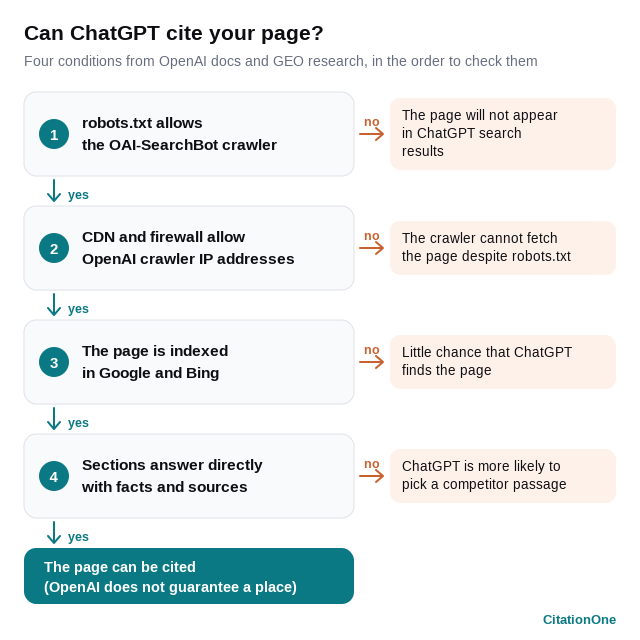
ChatGPT search optimization covers three areas. Steps 1-3 cover technical access (robots.txt, CDN and the Google and Bing indexes), steps 4-6 cover content that answers directly with facts and sources, and step 7 covers brand mentions on other sites. The order matters, because each step only makes sense once the previous one is in place.
1. Allow OAI-SearchBot in robots.txt
Check your robots.txt file at yourdomain.com/robots.txt. If it contains a Disallow rule for OAI-SearchBot or for all crawlers, ChatGPT will not show your site in search answers. At most, the site can then appear as a plain navigation link. A rule that keeps ChatGPT search open while blocking model training looks like this:
User-agent: OAI-SearchBot
Allow: /

User-agent: GPTBot
Disallow: /
GPTBot is a separate decision. You can block training and still stay in ChatGPT search, because OpenAI treats the two crawlers independently.
2. Check your CDN and firewall
OpenAI requires your hosting or CDN to allow traffic from the published IP addresses of OAI-SearchBot. Services such as Cloudflare have separate settings for AI crawlers, so your site can be open in robots.txt and still unreachable for ChatGPT. Check in your CDN dashboard that AI search crawlers have access, and check your server logs to confirm that OAI-SearchBot gets 200 responses. Responses such as 403 (forbidden) or 503 (unavailable) for its requests usually mean a firewall or bot protection rule is blocking it.
3. Get indexed in Google and Bing
ChatGPT relies on search partners, so a page outside the index has little chance of being cited. Submit your sitemap in both Google Search Console and Bing Webmaster Tools, then check that your most important pages are indexed in both. This is where classic SEO translates directly into ChatGPT visibility, because a page that ranks high is more likely to land in the set of pages ChatGPT reviews.
4. Answer your customers' questions directly
Collect the questions customers ask before they buy and answer them on your site. Every section should open with an answer in 1-2 sentences and make sense when cut out of the rest of the text, because answers quote passages from pages. The BLUF and chunk optimization dimensions describe how to check this.
5. Add facts, sources and quotations
In the study "GEO - Generative Engine Optimization" by a team from Princeton University, adding quotations, statistics and source citations raised visibility in AI answers by up to about 40%. A page in 5th place improved its score by 115.1% after adding sources. Sentences without facts lower the information density of a text and reduce its chance of being cited.
6. Describe your business consistently on your own pages
Your homepage, service pages, About page, case studies and contact page should give the same information, such as your company name, the services you offer, your location, prices or price ranges and examples of your work. When ChatGPT lands on your site while answering a question about service providers, it finds specific answers in place of generic slogans. A named author with their professional background and credentials, plus a visible update date, strengthen E-E-A-T.
You can also describe the same facts with schema.org structured data, for example the Organization type for your company and Article for blog posts. Structured data organizes information for the search engines ChatGPT relies on, although OpenAI does not describe its effect on source selection. A schema gaps analysis shows what is missing across your whole site.
7. Build mentions beyond your own site
For questions such as "which company does…", search results often include third-party sources such as roundups, rankings, directories and independent reviews. Being listed there raises the chance that ChatGPT comes across your brand even when it does not cite your own page. Forums and social platforms count too. In our analysis of Polish Google results, the most common AI Overviews sources from outside the top 10 were Facebook, YouTube and Reddit. That data comes from Google, not ChatGPT, but it shows that AI systems readily draw on user discussions.
In my view, this step most often decides who ChatGPT recommends, and it is also the one OpenAI says the least about. The documentation does not describe how ChatGPT weighs mentions on other sites, so treat this step as a conclusion drawn from how search works rather than a documented ranking factor.
What to avoid
Some tactics hurt your visibility in ChatGPT or only seem to help:
- Keyword stuffing, which lowered visibility in the Princeton study and performed about 10% worse than unchanged text on Perplexity.ai.
- Accidentally blocking OAI-SearchBot with a rule for all crawlers or with CDN settings.
- Content that answers the question only after a long introduction.
- Services that promise a "guaranteed position in ChatGPT", because OpenAI states plainly that a place in the results is not guaranteed.
"If nothing is guaranteed, why bother?"
Because you can raise your chances. Steps 1-3 decide whether ChatGPT can see your site at all, and steps 4-7 decide whether it finds the site worth citing.
How to check your visibility in ChatGPT
You check your visibility in ChatGPT by asking it the questions your customers ask and noting whether your brand or a link to your site appears in the answer. The simplest test looks like this:
- Pick 10-20 questions from different stages of the buying journey, from "what is…" to "which company does…".
- Ask them in ChatGPT with search turned on.
- Note whether your site is among the sources, whether your brand is named in the text and who appears in your place.
- Ask each question 2-3 times, because answers vary between attempts, and record how many attempts cite you.
- Repeat the test after a few weeks and after every major change to your site.
This test has limits. The result depends on location, memory and conversation history, and the same prompt can return different sources on different attempts. Checking dozens of queries by hand also takes hours.
The CitationOne audit checks whether ChatGPT's answer for a chosen keyword cites your page and compares your text with the top 10 on 10 content quality dimensions plus E-E-A-T. You get a list of fixes for specific sections, including follow-up questions worth covering according to fan-out and AIO coverage.
Summary
Visibility in ChatGPT starts with technical access, meaning robots.txt, your CDN and the index. After that, it depends on content that answers directly, backs up facts with sources and describes your business in specific terms. The fastest win is checking whether OAI-SearchBot can reach your site at all. After that, review your most important pages for answers to your customers' questions.
Check your page with the CitationOne audit to see whether ChatGPT cites it for your keyword and what to fix to raise your chances.
Frequently asked questions
How do I get mentioned by ChatGPT?
To get mentioned by ChatGPT, allow OAI-SearchBot in robots.txt and in your CDN, make sure your pages are indexed in Google and Bing, and answer your customers' questions directly with facts and sources. Mentions of your brand in roundups, reviews and forums on other sites raise the chance that ChatGPT comes across your business when it searches.
How do I rank for a keyword in ChatGPT?
To rank for a keyword in ChatGPT, write a page that answers the questions behind that keyword in its first sentences, make sure it ranks well in Google and Bing and is open to OAI-SearchBot, and get your brand mentioned on other sites that cover the topic. ChatGPT rewrites prompts into search queries, so a page that ranks for those queries is more likely to be cited.
Where does ChatGPT get its information?
ChatGPT answers from the model's knowledge gained in training, for which GPTBot collects data, or from a web search, for which OAI-SearchBot supplies pages. It runs a search on its own when a question needs current information, or when the user asks for it. It then rewrites the question into queries for its search partners and cites the pages it used.
Does blocking GPTBot remove my site from ChatGPT?
Blocking GPTBot does not remove your site from ChatGPT search. GPTBot collects data for training models, while OAI-SearchBot handles search results. OpenAI treats them independently, so you can block training and stay visible in search answers as long as OAI-SearchBot has access.
How fast does ChatGPT pick up a robots.txt change?
ChatGPT picks up a robots.txt change after about 24 hours, according to OpenAI's documentation. This applies both to allowing and to blocking a crawler. Whether a specific page then appears in answers depends on whether the crawler visits it and finds it relevant to the question.
Is ranking in ChatGPT the same as GEO?
Ranking in ChatGPT is one part of GEO, the practice of optimizing content for AI answers. GEO also covers Google AI Overviews, AI Mode, Gemini, Perplexity and Copilot. The basics are shared and the technical details differ. ChatGPT needs access for OAI-SearchBot, while AI Overviews and AI Mode take their sources from Google's index, so access for Googlebot matters there.
Sources
- OpenAI, Overview of OpenAI Crawlers, accessed 2026-11-10.
- OpenAI Help Center, ChatGPT search, accessed 2026-11-10.
- Aggarwal P., Murahari V., Rajpurohit T., Kalyan A., Narasimhan K., Deshpande A., GEO - Generative Engine Optimization, arXiv 2311.09735, KDD 2024, accessed 2026-11-10.