Keyword Cannibalization - What It Is and How to Fix It
Keyword cannibalization step by step. How to find it in Search Console, tell it apart from healthy results and choose a fix, like a 301, a merge or canonical.

Keyword cannibalization happens when two or more pages on one site serve the same search intent and compete for the same keyword in Google. Keyword cannibalization shows up in Search Console as several URLs swapping places for one query, and you fix it by choosing one target page and merging or redirecting the others, or by separating the intents if the pages should answer different questions.
Keyword cannibalization is also less common than it looks, because in 687 of 3,485 search results pages in our data one domain held 2 or more top 10 spots without any problem. It most often shows up on sites with a large blog and in online stores, where a category, a guide and a comparison post answer similar questions. This guide is for SEO specialists and editors who see ranking fluctuations and want to check whether their own pages are the cause.
What keyword cannibalization is
Keyword cannibalization occurs when multiple pages on one site target the same search intent and compete for the same rankings. Google picks one URL as the best result for a query, so when multiple pages rank for one query, it shows one, then the other, and the signals that could strengthen one page are split between two.
Typical symptoms look like this:
- URLs swap places for one keyword, with the guide ranking one week and the service page the next.
- Both pages hover in positions 8-20, although either one on its own could rank higher.
- A blog post shows up for a commercial keyword in place of the service or product page.
- External and internal links point sometimes to one page and sometimes to the other.
Keyword cannibalization differs from duplicate content. Duplicate content is the same content at different URLs, for example a version of a page with a parameter in the URL.
The effects of cannibalization show up in three places:
- Lower rankings for both pages, because the links and signals that could strengthen one URL are split between two.
- Traffic lands on the wrong page, for example a blog post collects visits from a commercial keyword while the offer page loses conversions.
- Unstable visibility, which makes it hard to judge the effect of any change on either page.
What causes keyword cannibalization
Cannibalization almost always comes from the lack of a plan that maps keywords to URLs. The most common causes are:
- No "keyword to URL" map, so the editorial team writes a new post on a topic the site already covers.
- Separate pages for similar keywords with the same intent, such as "price" and "cost" of the same product.
- A growing blog without reviews of old posts, where a guide from a few years ago and a new post answer the same question.
- Online store structure, in which a category, filter pages and product tags target the same keyword.
- A migration or redesign, after which the old and new versions of a page stay live at two URLs.
When two URLs in the results are not cannibalization
Two URLs from one domain in the top 10 do not automatically mean a problem. We counted this using CitationOne audit data. In 687 of 3,485 Polish search results pages (19.7%), one domain held 2 or more spots in the top 10, and in 4.1% even 3 or more. This is a lower bound, because the count excludes the page the audit was run for. We also excluded keywords from one client's niche, which inflated the result. The data comes from the Polish market, so treat it as a reference point.
Large sites such as marketplaces do this most often, but so do specialist stores with several categories for one keyword. Google shows two pages because each answers a different part of the question, for example a category and a buying guide.
A simple test tells you whether you have a problem:
- The pages answer different questions and both hold stable positions. There is nothing to fix, you simply have two entry points to your site.
- The pages answer the same question and their URLs swap places. That is cannibalization, and it is worth fixing.
How to find keyword cannibalization
Keyword cannibalization surfaces through four detection methods, the Search Console performance report, the site: operator, ranking history and a comparison of Google results for keyword pairs. The first is the most reliable, because it is based on 3-6 months of data for your own site.
1. The Search Console performance report
The Search Console performance report detects cannibalization with Google's own data for your site. In the performance report, add a query filter with the suspect keyword and switch to the "Pages" tab. If several URLs get a similar number of impressions for one query, you have a candidate to check. Set the date range to 3 or 6 months to see whether the URLs swapped places over time.
2. The site: operator in Google
Search Google for site:yourdomain.com keyword. Several pages on the same topic among the first results are a warning sign but not proof, because the operator shows pages that contain the keyword, not the ones that actually rank. For each pair of candidate URLs it finds, compare their titles and first paragraphs, and then check the pair in the Search Console performance report before you change anything.
3. Ranking history
Rank tracking tools record which URL ranked for a keyword on a given day. Two URLs alternating, for example page A in 6th place, then page B in 9th while page A disappears, is a classic symptom of cannibalization.
4. Comparing results for keyword pairs
When you have two pages for two keywords, check whether those keywords share results in Google. Several shared URLs in the top 5 mean that Google treats them as one intent, so the two pages will compete with each other. We describe this method in detail in What is keyword clustering and how to do it.
On a larger site, checking keywords by hand takes days. The content pruning tool analyzes your whole sitemap and flags pages that compete with each other, with a suggested action for each pair.
How to fix keyword cannibalization
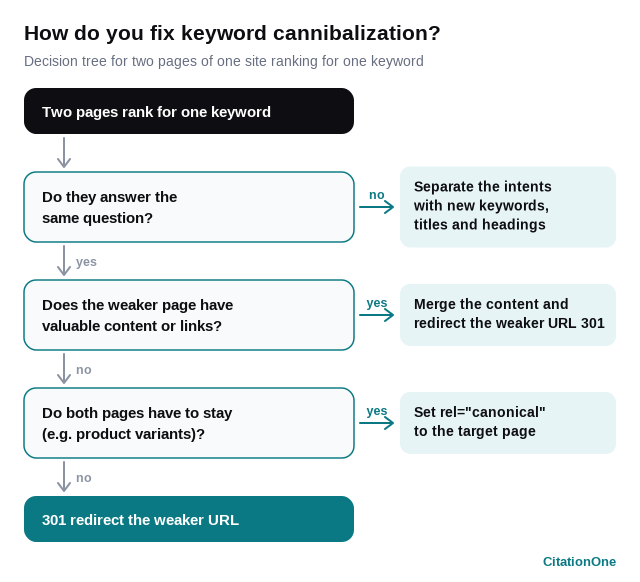
Fixing keyword cannibalization means choosing one target page, based on intent match, links and steady traffic, and one of five actions, namely merging with a 301 redirect, a 301 redirect alone, separating the intents, rel="canonical" or repointing internal links. The target page is the one that better matches the intent, has more links and steadier traffic.
| Situation | Action | Why |
|---|---|---|
| Same intent, the weaker page has valuable content or links | Merge the content into the target page and 301 redirect the weaker URL | Content and signals end up at one URL |
| Same intent, the weaker page adds nothing new | 301 redirect the weaker URL to the target page | You remove the competitor without losing links |
| Similar topic, different questions (for example a category and a guide) | Separate the intents with new keywords, titles and headings | Each page gets its own queries |
| Nearly identical pages that have to stay (for example product variants) | Set rel="canonical" to the target page | Google picks one URL for the results |
| Internal links point to the weaker page | Repoint links and anchor text to the target page | Your site itself signals which page matters |
Google's documentation describes a permanent redirect as a strong signal that the target URL should be canonical. It describes rel="canonical" the same way, but that tag is meant for duplicate or very similar pages, and Google may ignore it for two different texts. That is why merging with a 301 redirect works better when the cannibalizing pages have different content.
In my view, the most common mistake in fixing cannibalization is redirecting without merging. The weaker page often has a paragraph, a table or an answer to a follow-up question that the target page lacks. A redirect alone throws that content away, along with the arguments for which Google may have valued the weaker page.
"What if both pages get traffic and I am afraid of losing it?"
Merging usually keeps the traffic of both pages, because the target page takes over the content, links and queries of the weaker one. Short-term fluctuations after the change are normal. Judge the effect a few weeks after reindexing, comparing the clicks of both URLs before the change with the clicks of the target page.
An example decision with heat pump keywords
This example comes from our analysis of US Google results for 8 heat pump keywords. "Heat pump price" and "heat pump installation cost" share 3 of their top 5 results, and "how much does a heat pump cost" shares 2-3 with each of them. A site with one post on prices and another on installation risks cannibalization for "how much does a heat pump cost", because both pages answer the question about cost.
The fix is one article on heat pump costs with a section on installation. The installation post becomes a section of that article, and its URL gets a 301 redirect. The post "is a heat pump worth it" stays separate, because that keyword shares no top 5 result with the cost keywords.
Keyword cannibalization and AI answers
Cannibalization also weakens your visibility in AI answers. AI Overviews, AI Mode and ChatGPT usually cite one passage from a site for one follow-up question. When the answer to that question is split across two pages, each of them is a weaker candidate than one complete page that covers the topic and its follow-up questions.
One target page also meets the conditions AI systems check more easily, namely an answer at the start of each section, facts with sources and a full set of follow-up questions. We describe how to prepare such a page in How to write content for AI search.
How to prevent keyword cannibalization
Cannibalization is easiest to prevent at the content planning stage. Three habits are enough for most sites:
- Keyword clustering before writing, because one article covers the keywords from one cluster.
- Keyword mapping, a "keyword to URL" map in a spreadsheet that the editorial team checks before every new post. Each URL should target one primary keyword cluster with its close variants.
- Updating in place of a new post, when the site already has a page on the topic.
We explain how to update an existing post so that it takes over new keywords in How to update old blog posts for SEO and AI. After merging pages, also update your internal links. The internal linking tool prepares link suggestions.
Summary
Keyword cannibalization means two pages on one site answering the same question. Two URLs in the results are not a problem on their own. The problem is the same intent and URLs swapping places for one keyword. Start with the Search Console performance report for your most important keywords, and settle every pair you find by intent and by the value of the weaker page.
Check your site with the content pruning tool to get a list of pages that compete with each other, with a suggested action for each pair.
Frequently asked questions
What is an example of keyword cannibalization?
An example of keyword cannibalization is a site with one blog post on "heat pump price" and another on "heat pump installation cost". Google shows largely the same results for both keywords, so the two posts compete and swap places for "how much does a heat pump cost". Merging them into one cost guide with a 301 redirect fixes the problem.
Is keyword cannibalization a Google penalty?
Keyword cannibalization is not a penalty imposed on your site. It results from Google choosing one URL per query and splitting signals between two similar pages. The effect is fluctuating and lower rankings for both pages, which goes away after merging the pages or separating their intents.
Are two results from one domain always cannibalization?
Two results from one domain are a common sight, appearing in 19.7% of the Polish search results pages in our analysis. Cannibalization starts when both pages answer the same question and their URLs swap places in the results. Two stable pages answering different questions are a benefit.
Is a 301 redirect or a canonical tag better?
For two different texts answering the same question, merging with a 301 redirect is better, because the content and links end up at one URL. The rel="canonical" tag is meant for duplicate or very similar pages that have to stay available, such as product variants.
How long does it take to see results after fixing cannibalization?
Google has to reprocess both URLs and the redirect, so the first effects usually show up after a few weeks. You can speed this up by requesting reindexing of the target page with the URL Inspection tool in Search Console.
Sources
- Google Search Central, Redirects and Google Search, accessed 2026-11-15.
- Google Search Central, How to specify a canonical URL with rel="canonical" and other methods, accessed 2026-11-15.
- Search Console Help, Performance report, accessed 2026-11-15.
- CitationOne, analysis of 3,485 Polish search results pages from CitationOne audits (domains with 2 or more URLs in the top 10), and US Google results for 8 heat pump keywords, November 2026.