Content Pruning - How to Clean Up Your Content
Content pruning step by step. When to keep, update, merge or delete a page, what Google says about crawl budget and how to roll out a 301 redirect or a 410.


Content pruning is a review of every page on your site that ends with a decision for each one, to keep it, update it, merge it with another page, remove it from the index or delete it. Content pruning relies on 12 months of data from Search Console and analytics, and its goal is a site in which every page answers some intent and adds value. Google has written that a large amount of unhelpful content can also weaken the other pages on a site.
Content pruning pays off most on sites that published for years without a plan, with news items, short posts for single keywords and old promotions. This guide is for SEO specialists and editors who run a site with hundreds of pages and want a clear pruning process for deciding what to do with them.
What content pruning is
Content pruning is a content inventory that ends with a decision for every URL. The name comes from pruning trees, where you cut back weak branches so the strength goes to the ones that grow. The goal is a higher quality assessment of the whole site and steering traffic and links to the pages that have value for users and the business. It differs from a single post update because it covers the whole site, and from fixing cannibalization because it concerns every page on its own, not only pairs of competing pages.
The five decisions you make in content pruning:
- Keep, when the page has traffic, current facts and matches the intent.
- Update, when the topic is current but the text has aged or is incomplete.
- Merge, when the page answers the same question as another one, so its content moves to the target page and its URL gets a 301 redirect.
- Remove from the index (noindex), when the page is needed by your site's users but should not compete in Google.
- Delete, when the page has no traffic, no links and no value, and answers no intent.
We explain how to update a post in How to update old blog posts for SEO and AI, and how to settle pairs of competing pages in Keyword cannibalization - what it is and how to fix it.
When content pruning makes sense and when it is a myth
Content pruning makes sense when a site has a lot of low-quality content relative to the whole. In its 2022 announcement of the helpful content system, Google wrote that sites with relatively high amounts of unhelpful content are less likely to perform well in Search, and that for this reason removing unhelpful content could help the rankings of your other content.
The popular crawl budget argument is often overstated, though. Google's guide to managing crawl budget says it is intended mainly for sites with more than a million unique pages that change roughly once a week, or more than 10,000 pages that change daily. If your pages get crawled on the day you publish them, Google says the guide does not apply to you.
On a typical site, pruning brings three other benefits:
- A higher quality assessment of the whole site, with fewer weak pages dragging it down.
- Concentrated links and signals, because merged and redirected pages pass them to one URL.
- A clearer structure for users and crawlers, with one page per question.
"If deleting can help, wouldn't it be better to delete everything with little traffic?"
Low traffic can be misleading. A page may answer a niche question, have external links or support sales in another channel. Low traffic is a reason to review a page, not to delete it, and you make the decision only after assessing the content and intent.
How to do content pruning step by step
Content pruning takes six steps, namely a URL inventory, 12 months of data, an assessment of content and intent, assigning decisions, rolling out in batches and measuring after 4-8 weeks.
1. Build a URL inventory
Collect a list of all pages from your sitemap, a CMS export or a crawler such as Screaming Frog. Add the pages from the page indexing report in Search Console, because it also shows URLs that are not in your sitemap. Every page on the site should end up in one spreadsheet, with these columns:
| Column | Source |
|---|---|
| URL and page type | Sitemap, CMS or crawler |
| Clicks, impressions, average position (12 months) | Search Console |
| Sessions and conversions (12 months) | Google Analytics 4 |
| External links and internal links | Backlink tool and crawler |
| Last update date | CMS |
| Competing page on the same intent | Your review or a pruning tool |
| Decision and target URL | Your assessment |
2. Add 12 months of data
For each URL, add clicks, impressions and average position from Search Console and sessions and conversions from Google Analytics 4. Add the number of external links, the date of the last update and the number of internal links. A 12-month window evens out seasonality, which can make a seasonal guide look dead in April.
3. Assess the content and intent
A weak page usually shows several signals at once, such as no clicks for 12 months, outdated facts, no external links or another page on the site answering the same question. For low-traffic pages, check whether the topic is still current, whether the page answers any intent and whether another page on the site answers the same question better. This assessment decides between updating, merging and deleting, which the numbers alone cannot do.
4. Assign a decision
Every URL gets one of the five pruning decisions, keep, update, merge, noindex or delete, based on its traffic and links and the value of its content, as the decision matrix below shows. With hundreds of pages, start with groups that share a profile, for example all news items older than 3 years or all tag pages. Some pages stay regardless of traffic, such as legal pages, privacy policies, author bios, core service pages and pages published in the last few months.
5. Roll out the changes
Roll out in order, updates and merges first, then redirects and deletions last. Make the changes in batches of 10-20% of the pages to change, so you can measure the effect of each batch and catch mistakes. After each batch, fix internal links so they do not point to deleted URLs or through redirect chains.
6. Measure the effect
Compare the organic traffic of the whole site and of the remaining pages with the period before pruning. Draw your first conclusions after 4-8 weeks, because Google has to reprocess the redirected and deleted URLs.
The content pruning decision matrix
The matrix combines two axes, the page's traffic and links and the value of its content for the current intent.
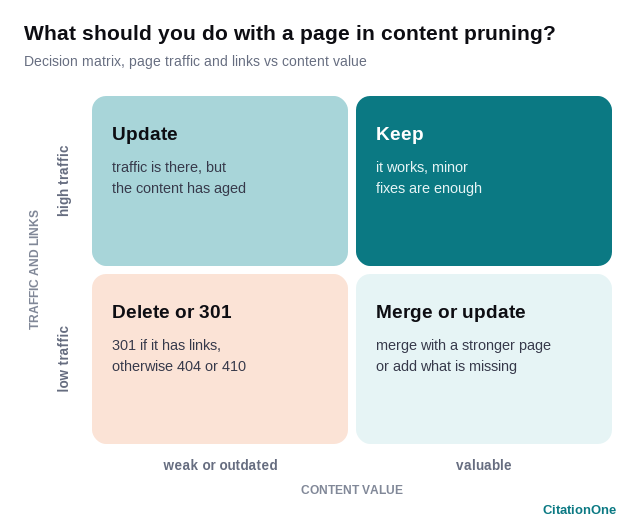
| Traffic and links | Content value | Decision |
|---|---|---|
| High traffic | Current and complete | Keep, with minor fixes if needed |
| High traffic | Outdated or incomplete | Update first |
| Low traffic | Valuable, but the same intent as another page | Merge into the target page and 301 redirect |
| Low traffic | Valuable, with a unique intent | Update and strengthen with internal links |
| No traffic, has external links | Weak or outdated | 301 redirect to the closest related URL |
| No traffic, no links | Weak, no intent | Delete (404 or 410) |
| Any | Needed by users, unnecessary in Google | Noindex, for example promotion terms or internal search results |
In my view, the middle of the table brings the most value in pruning, meaning pages with low traffic but good content. After a merge or an update, they often start to rank, because only then do they answer the intent in full. Deleting is the least interesting decision, even though it gets talked about the most.
How to remove or deindex a page technically
Each decision in the matrix has its own technical implementation, described in Google's documentation:
- A 301 redirect is, according to Google, a strong signal that the target URL should take the old one's place in the results, so use it for merges and for pages with links.
- 404 and 410 are treated the same by Google, as all 4xx codes (except 429) mean the content does not exist, and a previously indexed URL drops out of the index.
- Noindex in the robots meta tag or the X-Robots-Tag HTTP header keeps a page out of the results while it stays available to users. Google has to be able to fetch the page, though, so do not block it in robots.txt at the same time.
- A redirect to the homepage in place of a page on a similar topic does not answer the question the user came with, so always choose the closest related URL.
After rolling out, remove the deleted URLs from your sitemap and fix internal links. The internal linking tool prepares suggestions for new links between the pages that remain.
Content pruning and AI answers
Pruning also cleans up what AI systems can find on your site. When one complete page answers a question in place of three partial ones, the AI system gets one strong candidate to cite. Old pages with outdated numbers, on the other hand, sometimes get cited along with their wrong data, which hurts your brand's credibility more than not being cited at all.
The pages that remain after pruning are worth checking for section structure and facts with sources. We explain how in How to do a content audit for SEO and AI search.
Common content pruning mistakes
The most expensive mistake is deleting pages based on traffic alone, without checking external links and intent. All the typical mistakes look like this:
- Deleting based on traffic alone, without checking the page's external links and intent.
- Deleting seasonal pages based on a few months of data in place of 12.
- Redirecting to the homepage in place of the closest related URL.
- Forgotten internal links, which after pruning lead to 404 errors or through redirect chains.
- Noindex combined with a robots.txt block, which stops Google from seeing the noindex tag.
- No baseline before pruning, which makes it impossible to tell whether a later drop comes from pruning or from something else.
On a large site, the most time goes into finding pages that stray from the site's topic or compete with each other. The content pruning tool analyzes your sitemap, flags such pages and suggests an action for each one.
Summary
Content pruning is a decision for every page on your site, based on 12 months of data and an assessment of the content. Deleting is the last of five decisions, and updating and merging pages with good content and low traffic brings the most. Start with an inventory and Search Console data, and always redirect pages with external links in place of deleting them.
Check your site with the content pruning tool to get a list of pages that stray from your topic or compete with each other, with a suggested action for each.
Frequently asked questions
What is content pruning in SEO?
Content pruning in SEO is the process of reviewing every page on a site and deciding whether to keep, update, merge, deindex or delete it. Its goal is a site where every page answers an intent, so that weak content does not drag down the assessment of the rest. Most pages in a pruning project get updated or merged, and only a minority get deleted.
Does deleting content improve SEO?
Removing unhelpful content can improve the rankings of your other pages, as Google wrote when it announced the helpful content system in 2022. The effect depends on how many weak pages the site has relative to the whole, though. Deleting a few pages out of several hundred usually changes little.
404 or 410 when deleting a page?
For Google it makes no difference, because it treats all 4xx codes except 429 the same way, and the URL drops out of the index. Choose whichever is easier to set up on your server. What matters more is whether the page has external links, because then a 301 redirect is the better choice.
How often should you do content pruning?
Run content pruning about once a year on a site that publishes a few posts a month. Sites that publish daily, such as news portals, do it every 3-6 months. An extra round of pruning is worth doing after a site migration or a major change to your offer.
How many pages can you delete at once?
There is no limit, but it is safer to roll out changes in batches, for example 10-20% of the pages to change at a time, and to measure the effect of each batch. Batches make it easier to catch a mistake, such as accidentally deleting a page that got traffic from a source other than Google.
Sources
- Google Search Central Blog, What creators should know about Google's August 2022 helpful content update, accessed 2026-11-15.
- Google Search Central, Crawl budget management for large sites, accessed 2026-11-15.
- Google Search Central, How HTTP status codes, and network and DNS errors affect Google Search, accessed 2026-11-15.
- Google Search Central, Redirects and Google Search, accessed 2026-11-15.
- Google Search Central, Block search indexing with noindex, accessed 2026-11-15.