How to Update Old Blog Posts for SEO and AI?
How to update old blog posts so they climb back in Google and get cited in AI answers. 9 steps, a rule for changing the date and a before and after example.

To update an old blog post for Google and AI, pick a post that already has visibility, check what AI Overviews and ChatGPT cite for its keyword today, then add the missing answers, refresh the facts and sources and rebuild the opening of each section. Change the date only when the content has really changed, because Google lists refreshing the date alone among the signs of content written for search engines in place of readers.
Updating an old blog post, also called a content refresh, is SEO and content marketing work in which you improve a published post in place of writing a new one. You fill in facts, structure and answers to questions so that the page climbs back up in Google and gets cited in AI answers. Such a post already has history and links, so updating it usually takes less work than a new post from scratch. This guide is for people who run a blog or a guides section with dozens of older posts and want to decide which ones to improve and how. If you are writing a new post, see How to write content for AI search.
When to refresh, rewrite or remove
Refresh an old blog post at the same URL when its search intent is still the same and only its facts, examples or structure have aged. If the intent has shifted or more than half of the content is no longer valid, rewrite the post or remove the page.
| Situation | Decision |
|---|---|
| Same intent, outdated numbers, missing follow-up questions | Refresh the post at the same URL |
| The intent in Google results has changed (for example from a guide to a comparison) | Rewrite the post at the same URL |
| More than half of the content is outdated or wrong | Rewrite the post at the same URL |
| Two posts compete for the same keyword | Merge them into one and redirect the other URL |
| The topic has lost relevance and the page has no traffic or links | Remove the page or redirect it to the closest related post |
With a larger number of posts, a site-wide analysis speeds up these decisions, as in the content pruning tool, which flags pages that cannibalize each other.
How to choose posts to refresh
The best candidates for an update are old posts that Google already knows but that are not at the top. Look for them in the Google Search Console performance report, in the pages view:
- Posts with an average position of 4-15 for keywords with meaningful search volume.
- Posts that lost clicks when you compare the last 3 months with the previous 3.
- Posts with many impressions and a low CTR.
- Posts on topics that often come up in questions to AI, such as "how to…", "how much does… cost" and "what is the difference between…".
Why positions 4-15? Because in our analysis of Polish search results, the chance of being cited in an AI Overview drops fastest within the top 5, from 59.9% in 1st place to 35.3% in 5th place. Moving a post from 8th to 3rd place changes not only organic traffic from search results but also its chance of appearing in the AI Overview. This is a correlation from CitationOne audit data and does not prove cause.
The refresh process step by step
Updating a post for SEO and AI takes nine steps in three phases:
- Diagnosis (steps 1-2), checking what AI Overviews and ChatGPT cite for the keyword today and listing the gaps.
- Content changes (steps 3-7), with an answer at the start of each section, current facts with sources, follow-up questions, your own data and internal links.
- Publishing and measurement (steps 8-9), with the right date and a check after 2-4 weeks.
1. Check what Google and AI show today
Search for the post's keyword in Google and note whether there is an AI Overview, which pages it cites and which questions appear in "People also ask". Ask the same question in ChatGPT with search turned on and note the cited sources. Check Search Console for secondary keywords the post already gets impressions for, because they show which subtopics to strengthen. Also check whether the dominant format of the results has changed, for example from a guide to a list or a comparison.
2. List the gaps
List the gaps by comparing your post with the cited pages on four points, namely missing follow-up questions, data older than the cited sources, missing comparison tables and missing examples. This list is the scope of work for the next steps.
3. Rebuild the opening of the post and its sections
The first paragraph should answer the question in the title in 1-2 sentences, and every H2 section should open with the answer to its own question. Old posts often start with an introduction about the history of the topic, which you can cut to one sentence or move further down. The BLUF dimension describes this principle.
4. Update numbers, names and sources
Check every number, price, date, product name and feature name. Names of AI services and search features change especially often. Give a source and an as-of date for every number, and replace broken links and outdated external links with current primary sources. Also review screenshots and graphics, because an old dashboard design or an outdated chart undermines trust in the whole post. Replace them with current versions and update their alt text so it describes what the new image shows.
5. Add follow-up questions
For each missing question on your list, add a section or paragraph that answers it directly. AI systems split a question into subtopics, so every question you cover is another chance to be cited. The fan-out and AIO coverage dimension measures how many follow-up questions a post covers.
6. Add something your competitors do not have
Add at least one asset the top 10 does not have, such as your own data, test results, an example from practice or an expert comment. Google's guidance asks whether content provides original information or analysis that goes beyond the obvious. The information gain dimension shows how much a post adds beyond the top 10.
7. Update internal links
Update internal links in both directions. Add links to newer posts on the same topic, and links from them back to the post you are refreshing. Remove links to pages that have been merged or deleted. On a large site, the internal linking tool prepares link suggestions.
8. Set the date and structured data
A visible update date and the datePublished and dateModified fields in structured data tell Google and readers when the content changed. Google recommends keeping the dates on the page and in structured data consistent. The rule for when to change which date is described below. After publishing, you can request reindexing of the URL in Search Console, using the URL Inspection tool.
9. Measure the effect
Plan the first measurement after 2-4 weeks, so that Google has time to reprocess the page and rankings settle. We cover measurement methods in a separate section.
When to change the publication date
Change the date only when the content has changed substantially. Google's helpful content guidance lists this question among its warning signs, "Are you changing the date of pages to make them seem fresh when the content has not substantially changed?"
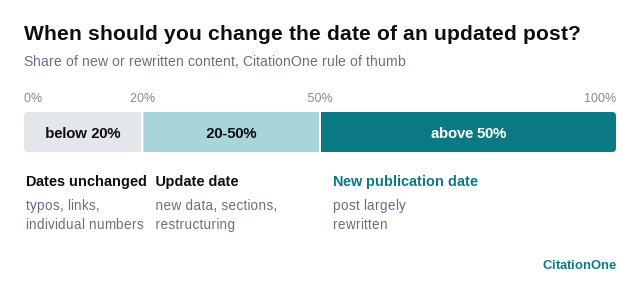
Google does not give a threshold for when a change counts as "substantial". At CitationOne we use a simple rule of thumb:
- More than 50% new or rewritten content means a new publication date.
- 20-50% changes mean an update date next to the original publication date.
- Below 20% changes, such as fixing typos, links and individual numbers, require no date change.
"What if changing the date raises CTR anyway?"
It might, until readers see that nothing in the post has changed. A date that promises something new without delivering costs you readers' trust, and Google lists it explicitly among its warning signs. In my view, it is the most expensive shortcut in the whole process. It is better to refresh fewer posts and make every date change honest.
Example of a refreshed passage
The example below shows a refresh of one section of an old guide to electric bikes (example figures).
Before
In recent years, electric bikes have become more and more popular. As we mentioned earlier, it is worth paying attention to the battery, which is very important. Good batteries let you ride really far.
After
The range of an electric bike depends mainly on battery capacity, and a 500 Wh battery typically covers 37-56 miles in a medium assist mode. Rider weight, terrain and temperature also affect range, because a battery loses some of its capacity in freezing weather.
The "after" version opens with the answer, names its topic without referring to the rest of the post, gives a number with a unit and immediately answers the follow-up question about what affects range.
How to measure the effect of a refresh
The effect of a refresh shows up in Search Console when you compare the periods before and after it for the page URL. Look at clicks, impressions, average position and CTR. Google includes traffic from AI Overviews and AI Mode in the same report, under the "Web" search type.
You can check presence in AI answers by repeating the test from step 1 and comparing the cited sources with your notes from before the refresh. Traffic from ChatGPT links is easier to spot in analytics, because according to OpenAI's publisher FAQ, ChatGPT adds the utm_source=chatgpt.com parameter to URLs.
You can also speed up steps 1-5. The CitationOne audit checks the search results and AI answers for a keyword, compares your post with the top 10 on 10 content quality dimensions plus E-E-A-T and returns a list of gaps to fill, which is a ready scope for the refresh.
Summary
Refreshing pays off most for posts that Google already knows but that are not at the top. Start by checking what AI cites for the keyword today and add what is missing, in place of changing the date alone. One properly refreshed post in positions 4-15 usually brings more than several new posts on topics where your site has no visibility yet.
Check your post with the CitationOne audit to get a list of gaps against the top 10 and AI answers, ready for your refresh.
Frequently asked questions
How often should you update old blog posts?
There is no single schedule for every post. Posts about prices, regulations, tools and AI are worth reviewing every 3-6 months, because their facts age quickly. Posts about stable principles need a check once a year or when Search Console shows a drop in clicks.
Can you edit a blog post after publishing?
You can edit a blog post after publishing, and updating it at the same URL is usually better than publishing a new version. Keep the URL, add an update date when the changes are substantial and request reindexing in Search Console. Small fixes such as typos or a broken link need no date change.
Does changing the date without changing the content help?
Changing the date alone does not improve a post, and Google's helpful content guidance lists it as a warning sign. Change the update date when the content has changed substantially, for example with new data, new sections or a restructured post. At CitationOne, we treat a change of at least 20% of the content as substantial.
What is the 80/20 rule for blogging?
The 80/20 rule for blogging is a rule of thumb that most results come from a small share of your posts, so most of your effort should go to those posts. In practice, it means spending a large part of your editorial time on updating and promoting the posts that already bring traffic, and less on producing new ones. It is a planning heuristic, not a Google guideline.
Should you change the URL when refreshing a post?
Keep the URL the same. The old URL has history in Google and links from other sites, which you would have to carry over with a redirect if you changed it. A new URL makes sense only when you merge several posts into one or change the topic of the page completely.
How long does it take to see results from a refresh?
Google does not give a fixed time frame, so plan the first measurement 2-4 weeks after the page is reindexed. For highly competitive keywords, rankings may take longer to settle. Check your presence in AI answers on a similar schedule, because it depends on whether the page enters the pool of sources.
Is it better to refresh an old post or write a new one?
Refresh the old post if the intent of the keyword has not changed and the page already has visibility or links. Write a new one if the intent in Google results differs from your post or more than half of the content is outdated. You can publish the new post at the old URL to keep its history.
Sources
- Google Search Central, Creating helpful, reliable, people-first content, accessed 2026-11-10.
- Google Search Central, Add a Byline Date to Google Search Results, accessed 2026-11-10.
- Google Search Central, AI features and your website, accessed 2026-11-10.
- OpenAI Help Center, Publishers and developers FAQ, accessed 2026-11-10.
- CitationOne, analysis of 996 Polish search results pages with an AI Overview from CitationOne audits, details in How to appear in AI Overviews.